
Folders, Tasks, and Reminders.
Organized on one simple screen.
Eliminate tab-switching. Plamogee gives students, freelancers and solo professionals one screen for notes, project tasks, and a proactive reminder feed.
- Encrypted note storage
- Instant note sync
- iOS, Android, Windows, macOS and Linux
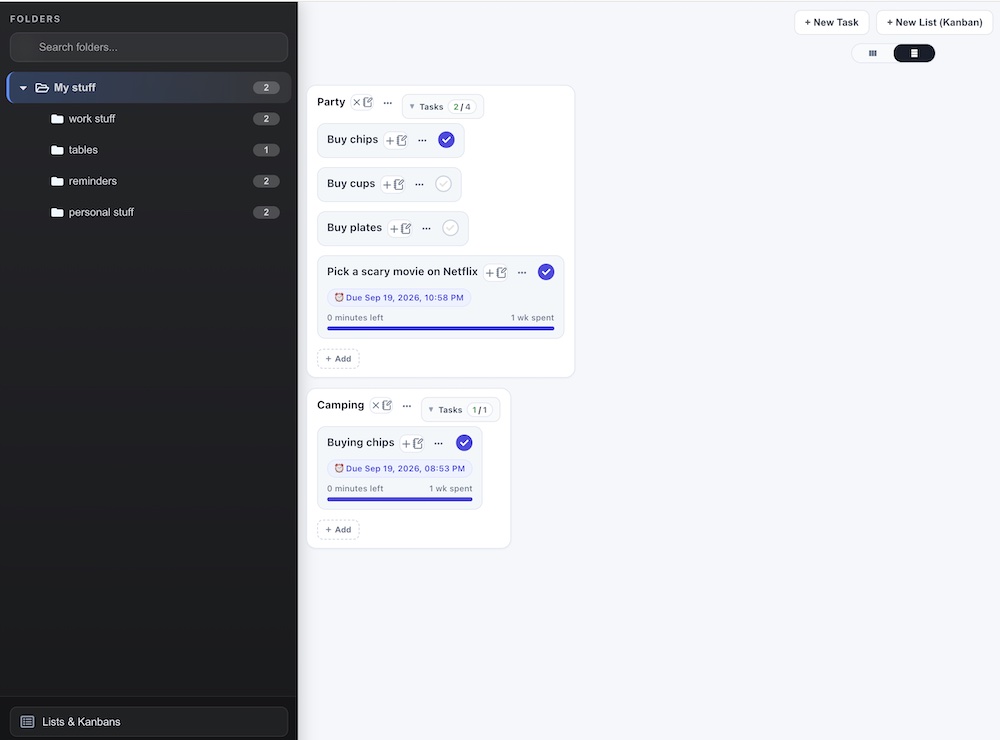
Track your life on One Screen
No hidden menus or page-jumping. Keep your nested folder tree, project task boards, and proactive reminder feed visible simultaneously.
- Folders & Tree Hierarchy: Deep project nesting with zero visual clutter.
- Visual Task Boards: View active Kanbans, task progress, and sub-items side-by-side.
- Proactive Time Feed: Natural date parsing that surfaces reminders right when you need them.
Built for focus, not feature bloat
Most tools force you to juggle separate apps for notes, tasks, and reminders. Plamogee unifies your entire workflow onto a single, zero-friction screen.
Zero Context Switching
Stop clicking through nested menus and opening endless browser tabs. Your folders, task boards, and reminders stay visible on one continuous canvas.
Proactive Awareness
Never lose track of what’s due next. Plamogee naturally parses typed dates and surfaces time-sensitive alerts before they fall through the cracks.
Frictionless Capture
Jot down fleeting ideas instantly using lightweight floating desktop stickies without disrupting your active workspace.
Clean, Modern Hierarchy
Deep folder trees with progressive disclosure ensure your projects stay structured without overwhelming your screen with visual clutter.
Questions people ask before they start
Is this another system I'll have to maintain?
No setup. Sign up, type a note, a task or a reminder, and it lands on the same screen. There are no templates to build, no databases to configure and no plugins to install. Try it free for 14 days, no credit card needed.
What happens when I hit my caps?
Standard includes 100 notes, 50 folders, 10 sticky notes, 20 lists, 20 tasks and 500 email reminders a month. When you reach one, Plamogee tells you and offers Advanced (500 notes, 200 folders, 50 sticky notes, 50 lists, 50 tasks and 1,000 email reminders a month).
How does the encryption work?
Your note content, folder names and images attached to notes are encrypted before they are stored. This is not end-to-end encryption: Geottuse can decrypt this data when it has to, to run the service, keep it secure, investigate abuse or meet a legal obligation. You can delete your account and all of your data from account settings at any time. Full detail is in the Privacy Policy.
Can I try it before paying?
Yes. Standard is free for 14 days with no credit card. After that it is $2.99 CAD a month, and you can pause or cancel anytime.
Which devices does it run on?
iOS, Android, Windows, macOS and Linux. Your notes sync between them.